


Features | Caracteristicas
Wardogs PHX — Silent Aim, artilharia e visuals para WarDogs
Wardogs PHX combina aimbot com Silent Aim e Teleport Bullet, calculadora de artilharia, ESP de players, loot e veículos, Chams, Glow, radar e editor de clima para controle total do campo de batalha.
REQUISITOS
• Operating system: Windows 10, Windows 11 (21H2, 22H2, 23H2, 24H2, 25H2, 26H1)
• Processor: AMD & Intel
• Video card: NVIDIA & AMD
• Client: Steam
RECURSOS PRINCIPAIS
AIMBOT
• Enable – turns the aimbot on or off
• Key – aimbot activation key
• Silent – directs bullets to the target without moving the camera
• Teleport Bullet – moves the bullet to the target immediately after the shot
• Aim Bone – allows you to select the bone to aim at (head, neck, chest, pelvis, or the closest one to the crosshair)
• Target Priority – target priority by proximity to the crosshair or by distance
• FOV – adjusts the target acquisition radius around the crosshair
• Smooth – configures aiming smoothness
• Max Distance – sets the target acquisition distance
• Visible Only – aims only at enemies in line of sight (not behind cover)
• Ignore Downed – excludes downed players from targets
• Friendly Fire – aims at teammates
• Sticky Target – keeps the selected target while the aimbot button is held
• Prediction – accounts for target movement and bullet drop to calculate lead
• Recoil Compensation – compensates for weapon recoil and camera displacement
• FOV Circle – displays the target acquisition area circle
• Aim Point – shows the active aiming point
• Snapline – displays a line from the crosshair to the target
• Highlight – highlights the selected target and displays labels (TARGET or LOCKED)
• Preview – shows the potential target before activating the aimbot
WEAPON
• No Recoil – disables weapon recoil
• No Spread – removes bullet spread
• Instant Bullet – moves the bullet to a visible enemy on the line of fire
• Instant ADS – instantly switches to aiming-down-sights mode
• No Gun Sway – disables weapon sway
• No ADS Sway – removes scope sway in ADS mode
• Grenade Prediction – displays the predicted grenade throw trajectory
• Grenade Bounces – shows grenade bounce points
• Blast Radius – displays the grenade explosion radius
• Victims – targets within the explosion radius
• Auto Calibrate – automatically determines speed, fuse time, and explosion radius based on the throw
ARTILLERY
• Mortar L81 – calculates aiming for the L81 mortar
• Howitzer SPH-2 – calculates aiming for the SPH-2 howitzer
• Tank Cannon – shows the predicted impact point of a tank cannon shell
• Shot Arc – allows you to choose an automatic, flat, or high-arc projectile trajectory
• Fire Cross – displays a ready-to-fire indicator (when the barrel is aimed at the target)
• Info Panel – shows distance to the target, aiming angle, and miss offset
• Flight Path – displays the projectile flight trajectory
• Impact Point – shows the predicted impact point of the projectile
• Map Pick – allows you to select an enemy or any point on the game map as the target
• Ping Aim – aims the weapon at an in-game placed marker
• Follow Target – tracks the selected enemy or vehicle in motion
• Auto Lay – automatically turns the weapon toward the target
• Incoming Shells – warns about nearby falling shells with a red circle and an "SHELLING" notification
• Emplacement ESP – displays mortars, drone stations, and emplacements with durability information and a friendly-object filter
PLAYERS ESP
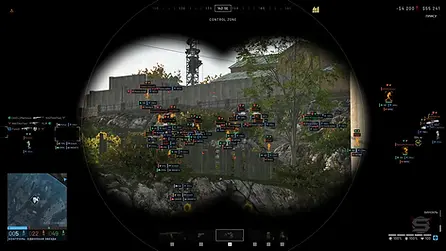
• Box – displays players as 2D boxes, corner boxes, or 3D boxes
• Health – shows health as a number, a bar, or both at the same time
• Team – displays squad information and the faction emblem as text, an icon, or both elements
• Max Distance – sets the maximum distance for displaying players
• Skeleton – displays player skeletons with line thickness settings
• Name – shows player nicknames
• Distance – displays distance to players
• Weapon – shows the weapon in the player's hands
• Visibility Icon – indicates player visibility with an icon
• Ping – displays the player's network latency
• Vehicle Crew – groups the crew of the same vehicle into a shared information panel
• Off-Screen Arrows – shows directional arrows to players outside the screen with radius and size settings
• Arrow Distance – displays distance to the player next to the arrow
• Aiming at Me – highlights players who can see you and are aiming in your direction (even beyond ESP distance)
• Visible Check – uses different colors for visible players and players behind cover
• Teammates – enable displaying teammates
• Downed – configures the display of downed players (boxes, skeleton, nickname, distance, faction, weapon, ping, visibility, and arrows)
• Corpse Loot – displays loot on dead players' bodies separately from regular loot
• Combat Mode – allows you to hide/show unnecessary ESP categories by pressing a button
• ESP Focus – limits full ESP display to a circle around the crosshair or to the area outside it
• ESP Text – allows you to configure the font, boldness, size, shadow, outline, and background of labels
LOOT & WORLD ESP
• Loot ESP – displays item names with separate distance settings
• Loot Kinds – allows you to configure the display of weapons, ammo, medicine, armor, items, and crates with individual colors
• World ESP – shows names and distances to game-world objects
• Grenade Warning – warns about grenade danger
• Grenade Radius – displays the explosion radius and lethal zone
• Mines / Claymores – shows mines and claymores with trigger-radius indication
• Other Deployables – displays other deployable objects
• Drones – shows drones and controllable devices with danger warnings
• Show Friendly – allows displaying your own mines and drones
• Grenades – marks grenades lying on the ground
• C4 / Explosives – displays C4 and other explosive devices
• Objectives – shows game objectives and mission objects
• Repair / Fuel – displays repair and refueling points
• Radios – marks radios on the map
• Supply Drops – shows supply drop points
• Helicopters – displays helicopters as game-world objects
• Safe Zone – shows the safe zone
VEHICLES
• Vehicle Box – displays vehicles as corner boxes, 2D boxes, or 3D boxes
• Marker – shows a marker on the vehicle
• Name – displays the vehicle name
• Snapline – draws a line from the screen to the vehicle
• Health – shows vehicle durability
• Status – displays the current vehicle status
• Fuel – shows fuel level
• Fuel Leak – indicates vehicles with a damaged fuel tank
• Speed – displays the vehicle's current speed
• Locked – shows whether the vehicle is locked
• Smoke / Flares Left – displays remaining smoke countermeasures and flares
• Ownership – allows filtering vehicles by affiliation: friendly, enemy, or neutral
• Faction Mark – shows the owner's faction emblem and name
• Colors – allows coloring vehicles with a single color, distinguishing friendly, enemy, and neutral vehicles, or using faction colors
• Nearby List – displays a list of nearby vehicles with distance
• Auto Flares – automatically deploys flares on helicopters and aircraft
• Missile Warning – warns about missile lock-on and shows time until impact
CHAMS (WALLHACK)
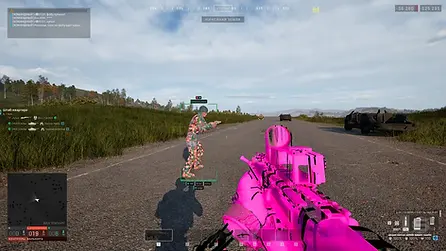
• Player Chams – colors player models with the selected material and texture through walls
• Wall Mode – display the material based on visibility or use two layers for visible parts and parts behind walls
• Style – allows you to choose a solid color, wireframe, tinted material, or a material from the list
• Overlay – applies an additional layer with the selected color, wireframe, or material
• Through Walls – displays player models through walls
• Chams Colors – allows setting separate colors for teammates and enemies, visible and hidden behind walls
• Glow – adjusts the material glow intensity
• Auto Materials – automatically selects materials during the match
• Hand Chams – applies the selected material to hand models
• Hand Mesh – allows you to choose an automatic hand model, one of two model variants, or the character mesh
• Rainbow – creates a shifting rainbow color effect on the hands, with the option to include the weapon
GLOW
• Player Glow – highlights player silhouettes
• Glow Presets – ready-made glow styles (soft, neon, outline, and bright)
• Glow Targets – allows selecting glow targets (enemies, teammates, and downed players, with distance fading)
• Glow Show – configures glow display (always, only visible, or through walls)
• Glow Style – allows you to choose soft glow, neon, outline, or fill
• Glow Color – configures color by team, visibility, health level, or rainbow effect
• Pulse – adds glow pulsing
• World Glow – highlights game-world objects, loot, and vehicles
• World Presets – offers object highlight styles (soft, beacons, and radar)
• World Style – allows you to choose a halo, ring, light pillar, or a combination of halo and pillar
• Object Kinds – allows selecting categories of highlighted objects (grenades, explosives, objectives, stations, radios, turrets, supplies, aircraft, and the safe zone)
• Vehicle Frame – displays a glowing frame around vehicles
• Danger Alert – highlights grenades and explosives within 15 meters in red with faster pulsing
• ESP Colors – allows using the same colors for glow as in the ESP settings
RADAR HACK
• Radar – displays a circular or square radar with radius, size, and transparency settings
• Rotate – rotates the radar according to view direction
• Grid – displays a coordinate grid
• View Cone – shows the player's field-of-view sector
• Height – indicates players and objects located above or below
• Clamp to Edge – clamps markers of distant objects to the radar edge
• Radar Filters – allows selecting the display of enemies, teammates, downed players, vehicles, and world objects
• Radar Loot – displays loot categories available in Loot ESP, including loot from dead players' bodies
• Game Map – displays enemies, downed players, and vehicles on the game map
• Map Colors – colors map markers according to faction affiliation
VIEW & CAMERA
• FOV Changer – allows changing the camera field of view
• Super Zoom – increases image zoom with an assigned key, with the option to disable the zoom limit
• Freecam – allows freely moving the camera using WASD, up and down movement, and speed adjustment
• Third Person – third-person camera mode
• Weapon Offset – allows shifting the weapon model forward, right, and upward
• Fullbright – adjusts the brightness of the game environment
• No Fog – disables fog
• No Suppression – disables visual suppression effects
• No Tinnitus – disables the ringing-in-the-ears effect
• No Particles – disables particle effects
• No Foliage – disables grass and vegetation rendering
• No Shadows – disables shadows
• No AA – disables image anti-aliasing
• No Decals – disables decals on surfaces
• No Translucency – disables surface transparency
• FPS Optimize – reduces graphics load with an optimization level selection (light, medium, strong, or maximum)
• Bullet Tracers – displays bullet trajectories as lines on the screen
WEATHER EDITOR
• Presets – ready-made weather and visual profiles (clear day, golden hour, moonlit night, storm, neon, toxic, cinema, noir, dream, and reset settings)
• World Grade – allows adjusting saturation, contrast, gamma, brightness, exposure, shadows, and overall image tint
• White Balance – adjusts color temperature and the green-magenta balance
• Tone Zones – allows separately adjusting the colors of shadows, midtones, and highlights
• Lens – adjusts bloom glow, its threshold, and chromatic aberration
• Vignette – darkens the edges of the screen
• Sky – allows adjusting the color and brightness of the sky and haze
• Clouds – adjusts cloud density and color
• Fog – allows adjusting fog density and color
• Time of Day – adjusts the time of day and sun position
• Light – allows adjusting the brightness and color of sunlight and sky lighting
• Wind – adjusts wind strength and speed
• Rain – allows adjusting rain intensity, streams, splashes, color, and visual precipitation effects
• Shot Effects – configures visual effects at the impact point, tracers, and sparks, including their scale and the number of simultaneously displayed effects
OTHER PHOENIX WARDOGS FEATURES
• Instant Interact – speeds up actions that require holding a key
• Infinite Stamina – disables stamina consumption
• Auto Reload – automatically performs active reloading for vehicles and artillery
• Build Hit – directs hammer strikes to the yellow marker without moving the camera
• Configs – allows saving and loading multiple settings profiles
• Multiple Profiles – supports several separate configurations for different sets of settings
O Wardogs PHX é indicado para quem quer aimbot, artilharia, ESP completo e personalização visual em WarDogs.
Media
Loading
Loading
wardogs phx, wardogs phoenix, phoenix wardogs, wardogs phx cheat, wardogs phoenix cheat, phoenix cheat wardogs, wardogs cheat, wardogs cheats, wardogs hacks, wardogs aimbot, wardogs silent aim, wardogs teleport bullet, wardogs prediction, wardogs esp, wardogs player esp, wardogs loot esp, wardogs vehicle esp, wardogs chams, wardogs wallhack, wardogs glow, wardogs radar, wardogs radar hack, wardogs artillery, wardogs mortar calculator, wardogs howitzer, wardogs no recoil, wardogs no spread, wardogs fov changer, wardogs freecam, wardogs weather editor, wardogs graphics, wardogs cheat 2026, wardogs phx 2026, war dogs phx, war dogs phoenix, war dogs cheat, war dogs esp, war dogs radar, war dogs aimbot, wardogs private cheat, wardogs premium cheat, wardogs pc cheat, wardogs cheat download, wardogs hack download
